Why Choosing the Right POS Software Matters
Your point-of-sale (POS) system is the backbone of your business — whether you run a café, a retail store, or an e-commerce platform. It handles payments, tracks sales, manages inventory, and provides analytics that drive smarter decisions.
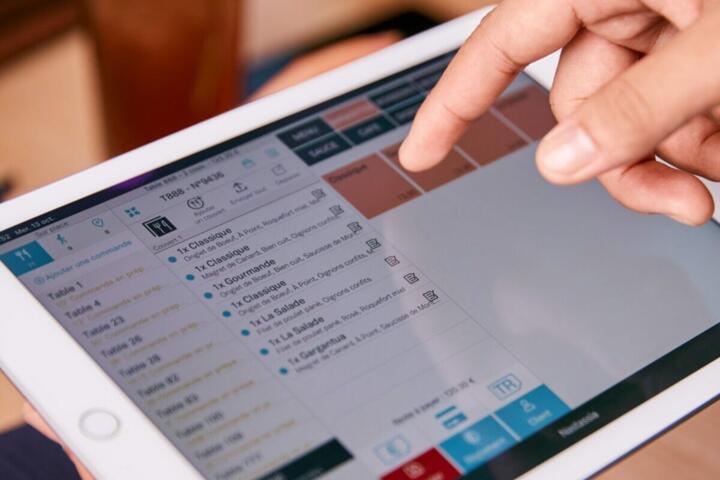
Choosing the wrong POS software can cost you more than just money. It can disrupt daily operations, lead to data errors, and frustrate both customers and staff.
That’s why understanding how to choose POS software is crucial. The right system aligns with your workflow, scales with your growth, and integrates seamlessly with your other business tools.
According to Grand View Research, the global POS software market is projected to reach $39.6 billion by 2027, driven by increased adoption of cloud-based systems and mobile payments.
What Is POS Software?
POS (Point of Sale) software is the digital system that processes sales transactions, tracks inventory, and records customer payments — whether in-store, online, or via mobile devices.
It’s the central hub connecting all aspects of your operations, from checkout to accounting.
Common Functions of POS Systems:
-
Sales processing: Accepts cash, credit/debit, and digital payments (e.g., Apple Pay, Google Pay).
-
Inventory management: Tracks stock in real time.
-
Customer relationship management (CRM): Stores buyer data for loyalty and marketing.
-
Reporting & analytics: Provides insights into top-selling products and revenue trends.
-
Employee management: Tracks hours, commissions, and permissions.
Example:
A restaurant using Toast POS can automatically update menu items, split checks, manage tips, and sync daily sales with accounting software like QuickBooks.
Types of POS Software
1. Traditional (On-Premise) POS Systems
Installed locally on servers or computers. Common in large retail chains or restaurants with complex infrastructure.
Pros:
-
Stable and reliable even without internet.
-
Often highly customizable.
Cons:
-
High upfront costs and maintenance.
-
Requires IT support and hardware setup.
Example: Oracle MICROS used by Hilton Hotels for global property management.
2. Cloud-Based POS Systems
Hosted online with access through browsers or apps. Ideal for small and medium businesses.
Pros:
-
Low initial investment.
-
Real-time access from any device.
-
Automatic updates and backups.
Cons:
-
Requires a stable internet connection.
Examples: Square, Shopify POS, and Lightspeed Retail.
3. Mobile POS Systems (mPOS)
Portable solutions used via tablets or smartphones. Perfect for food trucks, pop-up stores, or events.
Pros:
-
Affordable and flexible.
-
Quick setup.
Cons:
-
May lack advanced inventory or reporting features.
Example: Square Reader, used by small merchants for card payments on the go.
Key Features to Look for When Choosing POS Software
1. Payment Flexibility
Modern POS systems should accept all major payment types — cash, card, contactless, and digital wallets.
Pro Tip: Choose software that supports EMV (chip cards) and PCI-DSS compliance for security.
Top Brands: Square, Clover, PayPal Zettle.
2. Inventory Management
Your POS should automatically update inventory levels after every sale. This helps prevent overstocking or running out of popular items.
Look for:
-
Barcode scanning support.
-
Low-stock alerts.
-
Multi-location inventory tracking.
Example: Lightspeed POS provides real-time stock visibility across multiple retail stores.
3. Integration with Other Systems
The best POS software connects seamlessly with tools you already use, such as:
-
Accounting: QuickBooks, Xero
-
E-commerce: Shopify, WooCommerce
-
CRM and marketing: HubSpot, Mailchimp
Why it matters: Integrations eliminate double data entry and improve accuracy across systems.
4. Reporting and Analytics
Data-driven insights help you understand what’s working — and what’s not.
Essential Reports:
-
Daily sales summary
-
Top-selling products
-
Employee performance
-
Profit margins and trends
Example: Square Analytics offers real-time dashboards that help small business owners make faster decisions.
5. Employee Management and Access Controls
Your POS should track staff performance and prevent unauthorized access.
Features to prioritize:
-
Role-based permissions
-
Time tracking and scheduling
-
Sales commission tracking
6. Customer Relationship Tools (CRM)
Building loyalty starts with knowing your customers. POS software with built-in CRM helps you store purchase history, send offers, and manage loyalty points.
Example: Shopify POS automatically syncs customer data between in-store and online purchases, creating a unified experience.
7. Scalability and Customization
Your POS should grow with your business — not hold it back. Look for systems that allow you to:
-
Add new stores or locations easily.
-
Upgrade plans as you expand.
-
Customize receipts, menus, or dashboards.
Tip: Choose a system offering open APIs if you plan to build custom integrations later.
Steps to Choose the Right POS Software
Step 1. Define Your Needs
Start by listing your priorities.
Ask yourself:
-
How many locations or registers do you have?
-
Do you need offline functionality?
-
Will you handle online orders or delivery?
Example: A café might prioritize mobile payments and loyalty features, while a hardware store needs robust inventory tracking.
Step 2. Set Your Budget
POS software pricing varies widely.
Average monthly costs:
-
Small businesses: $30–$100/month
-
Medium-sized retailers: $100–$250/month
-
Enterprise solutions: $500+/month
Tip: Compare the total cost of ownership (hardware, software, support, and payment fees).
Step 3. Research and Compare Vendors
Use comparison tools or trials to test multiple POS platforms.
Leading Vendors in 2025:
-
Square: Best for small businesses.
-
Toast: Best for restaurants.
-
Lightspeed: Best for retail and multi-location stores.
-
Clover: Best for flexibility and customization.
-
Shopify POS: Best for omnichannel businesses.
Step 4. Request a Demo or Trial
Always test before committing. Check ease of use, speed, and compatibility with your existing hardware.
Ask Vendors:
-
How does the software handle peak sales hours?
-
What happens if the internet goes down?
-
Is there 24/7 support?
Step 5. Review Security and Compliance
Security is non-negotiable. Choose POS systems that include:
-
End-to-end encryption for card data.
-
PCI-DSS compliance.
-
User access controls to prevent fraud.
Step 6. Consider Support and Training
Even the best POS system needs onboarding support.
Opt for vendors offering:
-
Free setup assistance
-
24/7 customer service
-
Knowledge bases or training videos
Example: Toast provides in-person installation and online training for new restaurant clients.
Common Mistakes When Choosing POS Software
-
Focusing only on price: Cheap options often lack critical features or reliable support.
-
Ignoring scalability: Choose software that can grow with your business.
-
Overlooking integration: Disconnected systems waste time and increase errors.
-
Skipping user training: Staff unfamiliar with the software will slow down operations.
-
Not reading the fine print: Some vendors charge hidden fees for updates or transactions.
Author’s Insight
When I helped a boutique retailer transition from manual registers to Lightspeed POS, the impact was immediate. Within two weeks, they reduced checkout times by 40% and eliminated inventory mismatches completely.
The biggest lesson? Investing in the right POS isn’t an expense — it’s an enabler. A well-chosen system improves workflow, strengthens customer relationships, and gives owners the clarity to scale confidently.
My advice: test at least three vendors, focus on your workflow needs, and choose software that feels intuitive to your team.
Conclusion
Choosing the right POS software is one of the most important decisions for any business. The best systems go beyond processing payments — they streamline operations, improve customer experience, and provide actionable insights.
Start by understanding your business needs, exploring vendors like Square, Toast, and Lightspeed, and testing features before committing.
In today’s competitive market, efficiency and data visibility are everything — and the right POS system gives you both.
Bottom line: Don’t just buy software. Invest in a solution that powers your growth.