Introduction: Why CRM and Logistics Integration Matters More Than Ever
CRM and logistics integration has become essential for modern businesses that depend on efficient order processing, faster fulfillment, and real-time customer communication. Yet many companies struggle because integrating CRM data with logistics platforms—such as warehouse management systems (WMS), transportation management systems (TMS), or delivery tracking tools—is more complex than it looks. Poor integration leads to delays, customer miscommunication, fulfillment errors, and ultimately lost revenue.
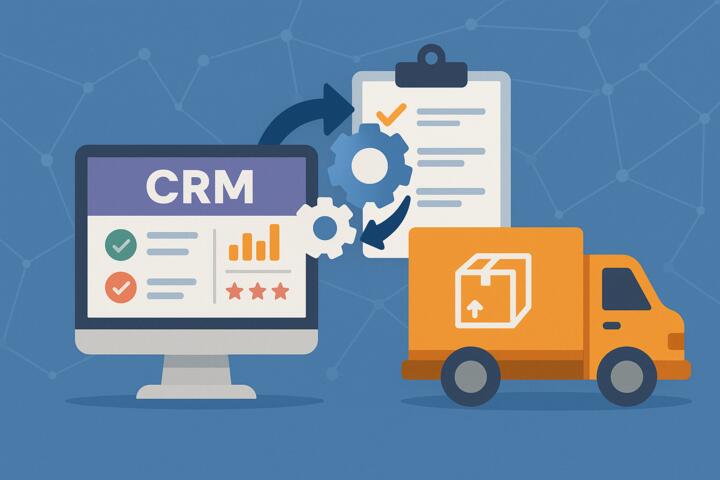
In this guide, we explore the most common CRM and logistics integration pitfalls and provide expert-driven fixes based on real-world practices from companies like DHL, Amazon Logistics, Salesforce, and SAP. Whether you’re working with HubSpot, Microsoft Dynamics, Zoho, or a custom CRM, these insights will help you streamline data flows, eliminate bottlenecks, and deliver a seamless end-to-end customer experience.
The Importance of Synchronizing CRM and Logistics Systems
Why Integration Is No Longer Optional
Today’s customers expect:
-
Accurate delivery dates
-
Live shipment updates
-
Transparent order statuses
-
Fast resolutions to issues
-
Proactive communication
But these expectations are impossible to meet if CRM and logistics systems remain isolated.
What Happens Without Integration
-
Incorrect ETAs
-
Duplicate orders
-
Misalignment between sales and warehouse teams
-
Higher return rates
-
Delayed communication
-
Low customer satisfaction
CRM and logistics integration bridges the gap between sales, operations, and delivery, allowing businesses to manage the full customer journey with precision.
Common CRM and Logistics Integration Pitfalls
Below are the frequent challenges businesses face when connecting CRM systems with logistics platforms.
1. Inconsistent or Poor Data Quality
Symptoms
-
Wrong delivery addresses
-
Duplicate customer profiles
-
Outdated phone numbers
-
Incorrect order quantities
Why It Happens
CRMs often contain messy or inconsistent data due to manual entry and lack of validation.
Consequences
-
Failed deliveries
-
Extra shipping costs
-
Delayed communication
-
Increased return-to-sender incidents
Fix: Implement Strong Data Governance
-
Enforce required fields
-
Use autocomplete address verification
-
Deduplicate customer records
-
Sync CRM and logistics fields
-
Establish data ownership roles
Companies like Salesforce and HubSpot provide built-in data cleansing tools to automate this process.
2. Wrong or Incompatible System Integrations
Symptoms
-
Orders failing to sync
-
API errors
-
Half-delivered data fields
-
Mismatched SKU names
Why It Happens
CRMs often connect to logistics platforms through outdated connectors or incompatible APIs.
Fix: Use Modern API-Based Integrations
-
Choose REST or GraphQL APIs
-
Avoid custom legacy connectors
-
Use middleware like Zapier, MuleSoft, or Make if needed
-
Ensure both CRM and logistics systems support webhook triggers
For enterprise-grade setups, SAP Integration Suite and Microsoft Power Automate provide robust connectors for logistics operations.
3. Delays in Real-Time Data Syncing
Symptoms
-
Sales team unaware of shipment delays
-
Customers receiving outdated delivery updates
-
Warehouse teams preparing incorrect orders
Cause
Batch syncing every 4–12 hours instead of real-time updates.
Fix: Enable Event-Driven Sync
-
Use webhook triggers for:
-
Order creation
-
Order modification
-
Shipment status updates
-
Inventory changes
-
-
Adopt event-driven platforms like Kafka for large enterprises
Real-time sync is essential for last-mile logistics and dynamic ETA updates.
4. Overcomplicated Workflows That Break Easily
Symptoms
-
Workflow rules fail after minor CRM changes
-
Sales stages do not align with fulfillment stages
-
IT constantly patches broken automations
Fix: Standardize Workflows Across Teams
-
Map CRM sales stages to WMS/TMS workflows
-
Use BPMN diagrams to visualize processes
-
Simplify automations—avoid dependency chains
-
Involve both sales and logistics teams in workflow design
Harvard Business Review reports that process alignment reduces cross-department delays by up to 35%.
5. Lack of Inventory Visibility Inside CRM
Symptoms
-
Sales reps promise items that are out of stock
-
Inventory not updated after shipments
-
Poor demand forecasting
Fix: Sync Inventory to CRM in Real Time
-
Connect your WMS/TMS to CRM inventory objects
-
Show expected restock dates inside CRM
-
Use low-stock alerts
-
Implement AI forecasting to prevent stockouts
Systems like Zoho Inventory, Cin7, and SAP Extended Warehouse Management offer built-in CRM integrations.
6. Manual Order Entry and Status Updates
Symptoms
-
Long delay between sale and shipment
-
Human entry errors
-
Lost or duplicated orders
Fix: Automate Order Creation
-
Auto-create orders in TMS/WMS when CRM deal closes
-
Automate invoice generation
-
Auto-sync tracking numbers back to CRM
-
Trigger proactive customer notifications
Tools like Shopify, Odoo, and NetSuite support automated order-to-fulfillment workflows.
7. No AI or Predictive Analytics Setup
Symptoms
-
No ETA prediction
-
No early warning for delays
-
Reactive, not proactive service
Fix: Integrate AI Tools for Better Forecasting
AI can predict:
-
Delivery delays
-
Warehouse bottlenecks
-
Inventory shortages
-
Shipping cost changes
Amazon and DHL heavily rely on AI for optimizing routing and predicting disruptions.
8. Security and Compliance Issues
Symptoms
-
Data breaches
-
Incorrect permissions
-
Exposure of customer data
Fix: Establish Strong Access Controls
-
Use role-based permissions
-
Encrypt data in transit (TLS)
-
Follow GDPR or SOC2 compliance
-
Conduct regular audits
CRM and logistics integration often involves sensitive customer and shipment data—security cannot be ignored.
How to Fix CRM and Logistics Integration Step-by-Step
1. Document All Processes from CRM to Delivery
Steps
-
Map how leads become orders
-
Map how orders become shipments
-
Identify handoff points
-
Highlight automation gaps
Clear process maps reveal inefficiencies early.
2. Clean and Standardize CRM Data
-
Validate addresses
-
Use standardized SKU and product naming
-
Deduplicate customers
-
Establish data ownership roles
A clean CRM ensures reliable logistics operations.
3. Select the Right Integration Tools
Depending on your ecosystem:
Small and Mid-Size Business Tools
-
Zapier
-
Make
-
HubSpot Operations Hub
Enterprise Tools
-
MuleSoft
-
SAP BTP
-
Microsoft Power Automate
Choose tools that support real-time sync and strong error handling.
4. Align CRM Stages With Logistics Stages
Sales Stages
-
Qualified → Proposal → Closed Won
Logistics Stages
-
Order Created → Picking → Packing → Shipping → Delivered
Alignment ensures no team operates in isolation.
5. Enable End-to-End Automation
Automate
-
Order creation
-
Inventory reservation
-
Shipping label generation
-
Tracking number sync
-
Customer notifications
This eliminates delays and manual bottlenecks.
6. Implement AI for Predictive Capabilities
AI improves:
-
ETA accuracy
-
Inventory forecasting
-
Fraud detection
-
Shipment risk scoring
Tools like Amazon Forecast, Google Vertex AI, and Microsoft Azure Machine Learning power predictive logistics.
7. Train Teams on the New Integrated System
Training should cover:
-
CRM usage
-
Order creation
-
Inventory lookup
-
Monitoring automated flows
-
Exception handling
Logistics and sales must work as one ecosystem.
Author’s Insight
I’ve seen companies lose thousands simply because their CRM didn’t tell the truth about inventory or delivery timelines. In one case, a client used a CRM that updated stock levels only once per day. As a result, their sales team kept selling items that were already allocated to shipments. After implementing a real-time integration between SAP and Salesforce, they reduced order cancellations by over 40% and improved customer satisfaction significantly.
The biggest insight?
CRM and logistics integration is not about connecting systems—it’s about making your entire organization operate with one shared truth.
Conclusion
CRM and logistics integration is essential for smooth operations, accurate deliveries, and high customer satisfaction. By understanding the most common pitfalls—data issues, poor synchronization, misaligned workflows, and outdated automation—you can build a modern system that brings sales, warehouse, and delivery teams into a unified operational flow.
With the right tools, processes, and proactive use of AI, companies can dramatically improve efficiency and create a seamless end-to-end customer experience.