Introduction: Why AI Integration Matters for CRMs and ERPs
Artificial intelligence is transforming customer relationship management (CRM) and enterprise resource planning (ERP) systems at an unprecedented pace. Businesses no longer use AI as a side tool — it’s becoming an operational foundation. Integrating AI into your CRM or ERP empowers your organization to automate manual tasks, forecast trends, personalize customer interactions, and optimize inventory and workflows.
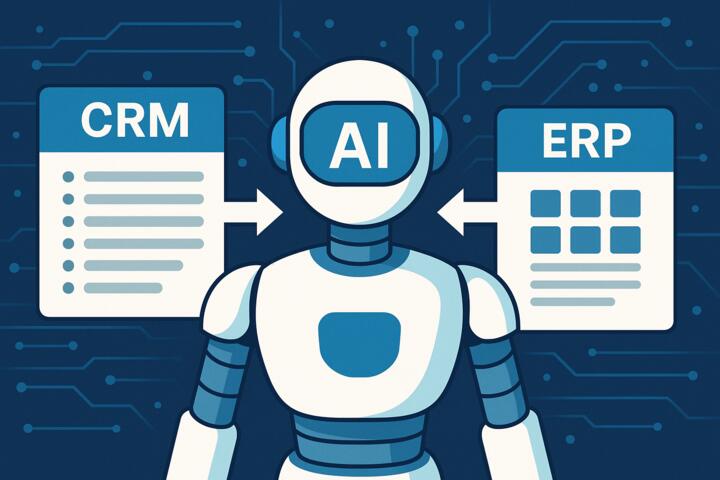
Whether you're using Salesforce, HubSpot, Microsoft Dynamics, Oracle ERP, SAP S/4HANA, or Odoo, AI enhances every process — from sales and onboarding to purchasing, billing, and service management.
Understanding how to integrate AI into your CRM or ERP system is now a critical competitive skill. Companies that implement AI effectively can outperform competitors by up to 30% in sales productivity and 25% in operational efficiency, according to Deloitte’s 2024 Digital Transformation Report.
What AI Can Do for Your CRM and ERP Systems
AI introduces automation, intelligence, and prediction into your CRM and ERP platforms.
For CRM Systems
-
Lead scoring and prioritization
-
Email and message automation
-
Sales forecasting
-
Personalized recommendations
-
Automated meeting notes
-
Customer sentiment detection
-
Support ticket routing
-
Chatbots and virtual agents
For ERP Systems
-
Demand forecasting
-
Inventory optimization
-
Automated procurement
-
Predictive maintenance
-
Financial forecasting
-
Fraud detection
-
Workflow automation
-
Supplier risk management
AI works like a “brain layer” on top of your existing systems, enhancing decisions and streamlining processes.
How to Integrate AI into Your CRM or ERP: Step-by-Step
This is a practical, actionable roadmap that applies to any CRM or ERP platform.
Step 1: Define Your AI Use Case and Business Goals
Many AI projects fail because the goals are vague. Start with a clear business problem.
Common CRM AI Use Cases
-
Improving lead quality
-
Automating sales emails
-
Reducing support response times
-
Increasing upsell and cross-sell rates
Common ERP AI Use Cases
-
Reducing stockouts
-
Optimizing purchasing cycles
-
Predicting cash flow
-
Optimizing logistics
Questions to Ask
-
What manual tasks waste the most time?
-
Where do errors frequently occur?
-
Which business decisions rely on inaccurate or slow data?
-
What process would benefit from automation or prediction?
Step 2: Audit Your Data Quality
AI is only as good as your data.
Perform a CRM/ERP Data Audit
-
Are your contacts clean and deduplicated?
-
Are product IDs consistent across systems?
-
Are there missing fields?
-
Is your data siloed in separate platforms?
Tools That Help
-
Talend
-
Fivetran
-
Informatica
-
Google BigQuery
Pro Tip:
AI requires structured, labeled, complete data. Invest in cleanup before integration.
Step 3: Choose the Right AI Tools for Your CRM/ERP
There are three main categories of tools.
1. Native AI Tools Built Into the CRM or ERP
Examples
-
Salesforce Einstein
-
HubSpot AI Assistant
-
Dynamics 365 Copilot
-
Zoho Zia
-
SAP Business AI
-
Oracle Fusion AI
Advantages
-
Easy implementation
-
Seamless user experience
-
Enterprise-grade security
Native AI is the fastest and often the safest option.
2. External AI Tools Connected via APIs
Examples
-
ChatGPT API
-
Google Vertex AI
-
AWS SageMaker
-
IBM Watson
Advantages
-
Fully customizable
-
Works across multiple platforms
-
Ideal for building custom AI workflows
Companies like Rakuten use multi-platform AI integrations for unified analytics.
3. No-Code AI Automation Tools
Examples
-
Zapier
-
Make (Integromat)
-
Workato
-
n8n
Use Cases
-
Automated CRM lead enrichment
-
ERP purchase order routing
-
Ticket classification
-
Document extraction
These tools are ideal for small to mid-size teams.
Step 4: Connect AI to Your CRM or ERP via API or Integrations
This is the technical heart of AI integration.
Typical Integration Steps
-
Enable developer access or API keys in your CRM/ERP
-
Connect your AI tool (e.g., OpenAI API)
-
Create data pipelines (read, write, update access)
-
Set up authentication (OAuth 2.0 / encrypted tokens)
-
Test data flow between systems
Example: Connecting ChatGPT to Salesforce
-
Create a Connected App
-
Configure OAuth permissions
-
Use Apex or middleware to send/receive data
-
Deploy workflow triggers
Example: Connecting AI to SAP ERP
-
Use SAP BTP (Business Technology Platform)
-
Build AI extensions
-
Use REST/OData services to sync data
Step 5: Integrate AI into Specific CRM and ERP Processes
AI becomes valuable only when embedded into real workflows.
CRM Integrations
1. Lead Scoring
Train models using:
-
Lead source
-
Time on website
-
Job title
-
Industry
-
Previous purchases
AI assigns each lead a probability-to-convert score.
2. Sales Email Automation
AI drafts emails based on:
-
Customer history
-
Sentiment
-
Stage of the sales pipeline
3. Customer Support Automation
AI can:
-
Auto-classify tickets
-
Suggest replies
-
Escalate urgent cases
-
Power chatbots
Brands like Coursera use this to reduce ticket response time by 40%.
ERP Integrations
1. Demand Forecasting
AI analyzes:
-
Seasonal patterns
-
Market trends
-
Supplier lead times
-
Historical sales
2. Procurement Automation
AI automatically:
-
Evaluates vendor performance
-
Flags delays
-
Predicts cost changes
3. Financial Forecasting
AI models help:
-
Predict revenue
-
Estimate cash flow
-
Detect anomalies
Especially useful for CFOs and finance teams.
Step 6: Test, Monitor, and Optimize AI Performance
AI is not “set it and forget it.”
Monitor These Metrics
-
Prediction accuracy
-
Workflow completion time
-
Error reduction
-
Employee feedback
-
Customer satisfaction
Using dashboards like:
-
Google Looker Studio
-
Power BI
-
Tableau
AI improves over time, but only with monitoring and tuning.
Common Mistakes When Integrating AI into CRM or ERP Systems
1. Implementing AI without a specific use case
Leads to wasted resources.
2. Dirty or inconsistent data
AI results become unreliable.
3. Expecting instant results
AI models need 2–8 weeks of real data.
4. No employee training
Staff won’t adopt tools they don’t understand.
5. Lack of security review
Always check compliance (ISO 27001, SOC2, GDPR).
Real-World Examples of AI in CRM/ERP
Hilton
Uses AI to automate customer support across regions.
Rakuten
Integrates AI with CRM for churn prediction and personalized marketing.
Deloitte
Uses AI in ERP to automate financial reporting and risk forecasting.
IBM
Uses internal AI assistants for procurement and contract analysis.
Author’s Insight
When I helped a mid-size SaaS company integrate AI into their HubSpot CRM, they wanted to automate lead qualification and support ticket routing. We implemented:
-
AI-powered lead scoring
-
Automated support classification
-
Predictive churn analytics
-
Smart email writing assistance
The results after 90 days:
-
Lead conversion increased by 27%
-
Support resolution time decreased by 34%
-
Sales reps saved 12 hours weekly
-
Customer churn dropped by 11%
The takeaway:
Start small, prove the value, then scale.
Conclusion: AI Is Now a Strategic Layer for CRM and ERP Success
Learning how to integrate AI into your CRM or ERP system is essential for staying competitive. AI enhances customer experience, automates manual work, improves forecasting, and strengthens decision-making across every department.
Organizations integrating AI early will operate faster, smarter, and more efficiently — setting new standards for digital performance.